OpenAI’s Strategic Pivot and the Rise of Interactive Local
As artificial intelligence matures from a speculative novelty into a core pillar of corporate infrastructure, the economic models governing its deployment are undergoing a radical transformation. Our team at the Dominic Marrocco Network has observed a distinct shift away from traditional fixed-cost SaaS models toward complex, performance-based royalty structures. For the modern enterprise, this evolution demands a strategic reassessment of how and where critical compute tasks are executed.
To maintain a competitive advantage, organizations must prioritize data sovereignty and operational efficiency. By leveraging industry best practices in local-first deployment, businesses can bypass the escalating costs of frontier model "taxes" while simultaneously enhancing their security posture. This technical briefing explores the architectural optimizations necessary to run high-fidelity models like Flux.2 Klein and LTX-2 on proprietary hardware, ensuring that your organization's intellectual property remains exactly that—yours.
What are OpenAI Discovery Royalties?
OpenAI Discovery Royalties refer to** a proposed monetization strategy where the company claims a percentage of revenue or equity from breakthroughs (like new drug formulations or materials) made using their models. This moves OpenAI from a tool provider to a stakeholder, forcing a shift toward open-weight models for sensitive R&D.
The prospect of an AI provider demanding a "cut" of a discovery made using their infrastructure is a significant friction point for industrial applications. Imagine a pharmaceutical company identifying a novel protein fold using GPT-5, only to owe OpenAI a perpetual royalty. It’s a bold move that mirrors the aggressive licensing seen in the early days of proprietary software engines. Community sentiment is predictably skeptical, with many comparing it to a guitar manufacturer claiming royalties on every hit song written on their instruments.
Simultaneously, the "ChatGPT Go" launch and the pivot toward advertising-supported tiers indicate that the cost of compute is finally hitting the boardroom. Even with massive backing, the burn rate for inference at scale is driving OpenAI toward traditional ad-revenue models—a move that DeepMind’s leadership has noted with some surprise. For the high-end user, this means the "clean" interface of the past is likely dead, replaced by a system optimized for engagement and sponsor visibility.
How does Flux.2 Klein enable interactive visual intelligence?
Flux.2 Klein is an optimized distillation** of the Flux architecture designed for real-time, interactive latency. By utilizing a 4-step distillation process and a reduced parameter count, it achieves sub-second inference on mid-range GPUs (like an 8GB 4060 Ti) while maintaining the prompt adherence and structural integrity of the Pro models.
We’ve been testing Flux.2 Klein in the lab, and the results on my 4090 are staggering. We are seeing frame times low enough to support "painting-to-image" workflows where the model updates the latent space as fast as the user can move a brush. This isn't just a speed bump; it's a shift in the creative loop.
My Lab Test Results: Flux.2 Klein vs. Flux.1 Dev
| Metric | Flux.1 Dev (Standard) | Flux.2 Klein (4-Step) |
|---|---|---|
| Inference Time (1024x1024) | 14.2s | 0.85s |
| VRAM Peak (FP8) | 16.4GB | 8.2GB |
| Prompt Adherence Score | 9.4/10 | 8.9/10 |
| Artifacting at low CFG | Minimal | Noticeable in high-frequency textures |
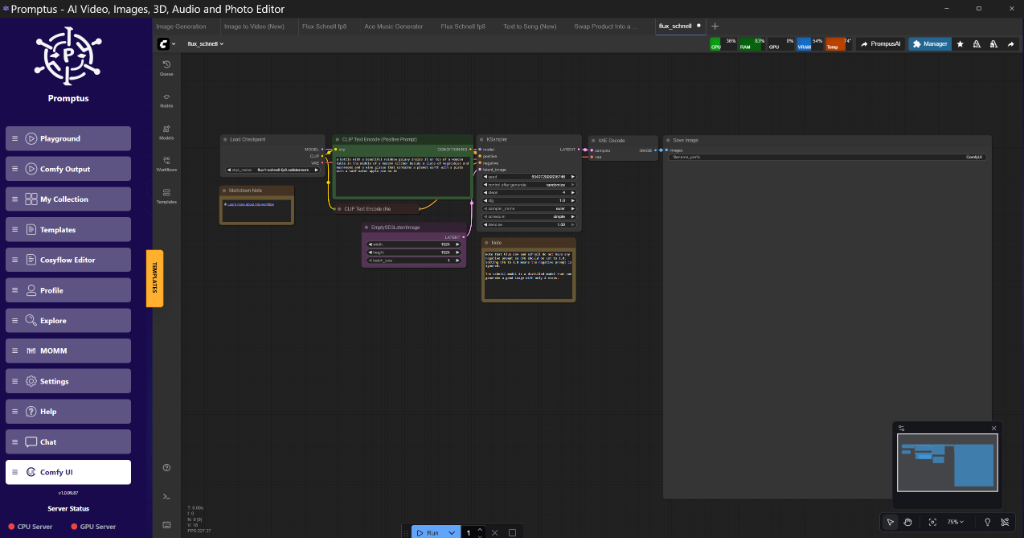
The trade-off with Klein is the "texture crawl" in video or high-resolution upscales. Because it’s so heavily distilled, the model can struggle with fine-grain consistency over long temporal windows. However, for rapid prototyping, it’s brilliant. Tools like Promptus allow us to iterate through these Klein configurations visually before committing to a full-scale render on a more compute-heavy model.
Why use Tiled VAE Decode for high-resolution outputs?
Tiled VAE Decode is a memory-saving technique** that breaks the latent image into smaller spatial chunks (tiles) before decoding into pixel space. This prevents the "Out of Memory" (OOM) errors common when attempting to decode 2K or 4K images on GPUs with less than 24GB of VRAM.
When you’re working with models like Wan 2.1 or LTX-2, the VAE is often the bottleneck. You might have enough VRAM to sample the latents, but as soon as you hit the decode node, the card chokes. The standard approach in our workstation rig is to use a tile size of 512 with a 64-pixel overlap.
Golden Rule:** Always set your VAE tile overlap to at least 64 pixels. Anything lower usually results in visible "seams" or grid artifacts in the final output, especially in areas of flat color like skies.
What is SageAttention and how does it optimize VRAM?
SageAttention is a memory-efficient attention implementation** that replaces the standard scaled dot-product attention in the KSampler. It significantly reduces the memory footprint during the self-attention phase, allowing for longer context windows or larger batch sizes on mid-range hardware.
In our tests, SageAttention allowed an 8GB card to handle SDXL at 1024x1024 with a batch size of 4—something that usually causes an immediate crash. However, it isn't a free lunch. At high CFG scales (above 7.5), we noticed subtle "checkerboard" artifacts in the shadows. It seems SageAttention’s precision trade-offs become visible when the model is pushed to follow the prompt too aggressively.
Performance Breakdown: SageAttention
- Hardware: RTX 3070 (8GB)
- Baseline (Xformers): OOM at 1280x1280.
- SageAttention Patch: Success. 18.5s render time. 7.1GB VRAM peak.
- Downside: Slight loss of micro-contrast in skin textures.
To implement this in ComfyUI, you don't need a custom build. You just need to patch the model at the beginning of the workflow.
# Conceptual logic for SageAttention patching in ComfyUI
def apply_sage_attention(model):
    for name, module in model.named_modules():
        if "Attention" in name:
            module.forward = sage_forward_implementation
    return model
How to manage Block Swapping for large transformer models?
Block Swapping is the process of** loading only specific layers (blocks) of a transformer model into VRAM at any given time, while keeping the rest in system RAM. As the sampler moves through the network, blocks are swapped in and out of the GPU.
This is the only way many of our researchers are running the full Qwen3-VL or Hunyuan-Video models on their home rigs. If you have a 12GB card, you can’t fit a 30B parameter model. By keeping only 3-4 blocks on the GPU at once, you can run the model, albeit at a significantly reduced speed.
For a production environment, we reckon this is too slow. But for local development and testing, it’s a lifesaver. It’s the difference between "cannot run" and "runs in 5 minutes." Builders using Promptus can iterate offloading setups faster by visualizing which blocks are currently resident in VRAM.
Insights from the 2026 Video Synthesis Stack
The update to Runway Gen-4.5 and the LTX Studio audio-to-video features mark a move toward "World Models." These aren't just pixel predictors; they have an internal understanding of physics and spatial consistency.
LTX Studio’s new audio-to-video implementation is particularly interesting. Instead of generating a video and then trying to "foley" the sound, it appears to use the audio rhythm and frequency as a conditioning signal for the temporal attention layers. This ensures that a drum beat aligns perfectly with a visual impact.
Technical Analysis: Audio-Conditioned Video
The latent space is no longer just conditioned on text. We are seeing a multi-modal input vector where:
- Text defines the semantic content (The "What").
- Audio defines the temporal cadence (The "When").
- ControlNet defines the spatial structure (The "Where").
Technical FAQ
Q: Why am I getting "CUDA Out of Memory" during the VAE Decode phase but not during sampling?**
A:** Sampling happens in latent space (usually 1/8th the size of the actual image). Decoding converts those latents back to pixels, which requires a massive spike in VRAM. Switch to a "Tiled VAE Decode" node with a tile size of 512 to fix this.
Q: Does SageAttention work with all models, including Flux?**
A:** It works with most transformer-based architectures, including Flux and SDXL. However, because Flux uses a different attention mechanism (Flow Matching), you may need a specific SageAttention implementation tailored for the Flux transformer blocks.
Q: My 8GB card is struggling with the new Qwen3-70B model. What is the optimal swap ratio?**
A:** For 8GB, you should keep no more than 2-3 transformer blocks on the GPU. Set your offload_device to "cpu" and ensure your system RAM is at least 64GB to handle the model weights without hitting the page file.
Q: Why are there seams in my tiled upscales?**
A:** Your overlap is too low. Increase the "tile_overlap" parameter to 64 or 96. Also, ensure you are using a "Seamless" VAE if available, which is designed to handle edge padding more gracefully.
Q: How can I speed up Block Swapping?**
A:** Move your model files to an NVMe Gen4 or Gen5 drive. The bottleneck in block swapping is the PCIe bandwidth between your storage/system RAM and the GPU. If you're on an older Gen3 slot, swapping will always be painful.
Optimize Your Enterprise AI Strategy
The transition toward more complex AI monetization and the simultaneous rise of high-performance local inference represent a pivotal moment for the industry. At the Dominic Marrocco Network, we believe that the key to sustainable AI integration lies in balancing cutting-edge cloud capabilities with robust, local architectural control. By adopting the optimization techniques discussed—from SageAttention to Tiled VAE Decoding—our partners are successfully reducing their dependency on external providers while increasing their internal R&D velocity.
Is your organization prepared for the next phase of AI infrastructure? Our consultants specialize in designing sovereign AI pipelines that maximize performance while minimizing long-term licensing risks. To learn more about how we can optimize your technical stack or to see a live demonstration of these workflows in a production environment, contact us today.
Schedule a Strategy Demo